Anchors: A Visual Guide to Rule-Based Explanations for ML Models #
By Ilya Krasheninnikov
Full Code Available on Colab
What Are Anchors and Why Do We Need Them? #
Imagine you’re using a machine learning model that predicts whether someone’s income exceeds $50,000 per year. The model says “yes” for a particular person, but you don’t know why. You need an explanation that’s:
- Simple enough for non-experts to understand
- Precise enough to trust
- Actionable for real-world decisions
This is where anchors come in. Anchors provide rule-based explanations that tell you: “If these specific conditions are met, the model will (almost) always make this prediction.”
Definition: The Formal Math Behind Anchors #
An anchor is a set of conditions (or “predicates”) that “anchor” the model’s prediction, meaning when these conditions are met, the prediction stays the same even if other features change.
Mathematically:
\(P(f(z) = f(x) | A \subseteq z) \geq \tau\)Where:
- \(f(x)\) is the original prediction for instance $x$
- \(z\) represents perturbed (slightly changed) instances
- \(A\) is our anchor (set of conditions)
- \(\tau\) is our precision threshold (typically 0.95)
In plain English: “When conditions in anchor \(A\) are satisfied, there’s at least a 95% chance the model will make the same prediction.”
How Anchors Work: An Intuitive Explanation #
Anchors work by finding the smallest set of features that “lock in” a prediction. Let’s walk through the process visually:
- Start with an instance: Take a data point the model has classified
- Generate variations: Create many similar instances with small changes
- Identify stable features: Find which features, when fixed, maintain the prediction
- Build minimal rules: Construct the simplest set of rules that guarantees the prediction
Example: Income Prediction #
For someone predicted to have high income (>$50K), an anchor might be:
IF occupation = 'Executive' AND education ≥ Bachelor's AND marital-status = 'Married'
THEN Income = >$50K (with 96% precision)
This means: “If these three conditions are met, the model will predict >$50K income with 96% confidence, regardless of other factors.”
Step-by-Step Algorithm Breakdown #
Let’s break down how the Anchors algorithm works, step by step:
1. Perturbation Engine #
The first step is to create perturbed instances - variations of our original data point where some features are changed while others remain fixed.
def perturb_instance(instance, categorical_features, numerical_features, feature_ranges, n_samples=1000):
    """Generate perturbations of an instance while respecting current anchor rules"""
    perturbed = []

    for _ in range(n_samples):
        # Start with a copy of the original instance
        new_instance = instance.copy()

        # Perturb categorical features (50% chance to change each)
        for feature in categorical_features:
            if np.random.random() > 0.5:
                new_instance[feature] = np.random.choice(feature_ranges[feature])

        # Perturb numerical features (50% chance to change each)
        for feature in numerical_features:
            if np.random.random() > 0.5:
                min_val, max_val = feature_ranges[feature]
                new_instance[feature] = np.random.uniform(min_val, max_val)

        perturbed.append(new_instance)

    return pd.DataFrame(perturbed)
2. Candidate Generation #
Next, we generate candidate rules that might form our anchor:
For categorical features (like occupation, marital status):
- Create exact match rules:
occupation = 'Doctor'
For numerical features (like age, income):
- Create range predicates:
age >= 27andage <= 33
# Categorical predicates
for feature in categorical_features:
    candidate_predicates.append((feature, instance[feature]))

# Numerical predicates (we use ±10% from instance value)
for feature in numerical_features:
    value = instance[feature]
    candidate_predicates.append((feature, ('>=', value * {0.9}})))  # Within 10% below
    candidate_predicates.append((feature, ('<=', value * {1.1}})))  # Within 10% above
3. Precision Calculation #
For each candidate rule, we need to measure its precision - how reliably it “locks in” the model’s prediction:
- Generate perturbations that satisfy our rule
- Ask the model to predict on these instances
- Calculate how often the prediction matches our original prediction
def compute_precision(rule, instance, model, categorical_features, numerical_features, feature_ranges):
    # Generate perturbations
    perturbed = perturb_instance(instance, categorical_features, numerical_features, feature_ranges)

    # Filter samples that satisfy the rule
    satisfying_samples = apply_rule(perturbed, rule)

    if len(satisfying_samples) == 0:
        return 0.0

    # Get original prediction
    original_pred = model.predict(pd.DataFrame([instance]))[0]

    # Get predictions for samples that satisfy the rule
    preds = model.predict(satisfying_samples)

    # Compute precision
    precision = np.mean(preds == original_pred)

    return precision
4. Beam Search Optimization #
Finally, we use beam search to find the optimal set of rules. Beam search is like climbing a mountain while exploring multiple paths:
- Start with an empty anchor
- Try adding each candidate rule
- Keep the top-K best anchors
- Repeat until we reach desired precision
This helps us find a minimal set of rules with high precision.
def beam_search(instance, model, categorical_features, numerical_features, feature_ranges,
               precision_threshold=0.95, max_anchor_size=5):
    # Start with empty anchor
    current_anchor = []
    best_anchor = []
    best_precision = 0.0

    # Generate candidate predicates...

    # Beam search
    for _ in range(max_anchor_size):
        candidates = []

        for predicate in candidate_predicates:
            if predicate not in current_anchor:
                new_anchor = current_anchor + [predicate]
                precision = compute_precision(new_anchor, instance, model,
                    categorical_features, numerical_features, feature_ranges)
                candidates.append((new_anchor, precision))

        if not candidates:
            break

        # Sort by precision and select best
        candidates.sort(key=lambda x: x[1], reverse=True)
        current_anchor, precision = candidates[0]

        # Update best anchor if threshold met
        if precision >= precision_threshold and precision > best_precision:
            best_anchor = current_anchor
            best_precision = precision

        if precision >= precision_threshold:
            break

    return best_anchor, best_precision
Real-World Case Studies #
Let’s see how Anchors works in practice with real examples from the Adult Income dataset:
Case Study 1: High Income Individual #
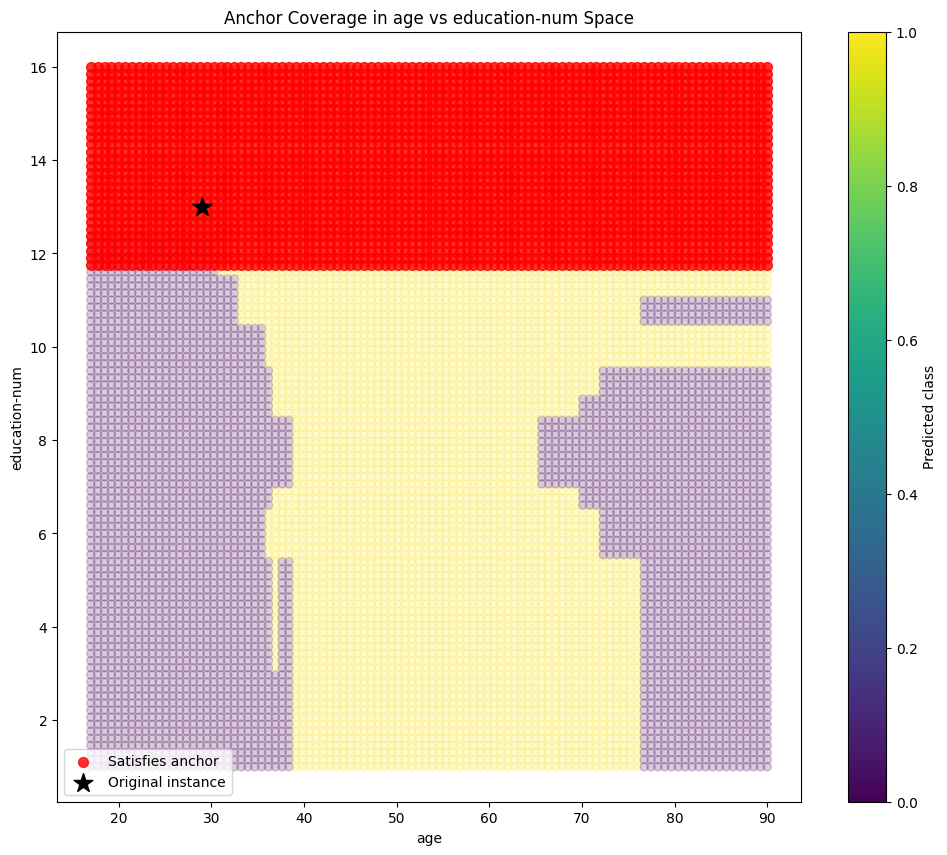
Individual characteristics:
  - age: 29
  - workclass: Private
  - education: Bachelors
  - marital-status: Married-civ-spouse
  - occupation: Exec-managerial
  - relationship: Husband
  - hours-per-week: 55
  - native-country: United-States

Model prediction: >50K

Explanation:
IF occupation = 'Exec-managerial' AND education-num >= 11.70 AND marital-status = 'Married-civ-spouse'
THEN income = >50K

Precision: 0.9623
Case Study 2: Low Income Individual #
Individual characteristics:
  - age: 45
  - workclass: State-gov
  - education: HS-grad
  - education-num: 9
  - marital-status: Married-civ-spouse
  - occupation: Exec-managerial
  - relationship: Wife
  - race: White
  - sex: Female
  - capital-gain: 0
  - hours-per-week: 40

Model prediction: <=50K

Explanation:
IF capital-gain <= 0.00 AND education-num <= 9.90 AND fnlwgt <= 55623.70
THEN income = <=50K

Precision: 0.9725
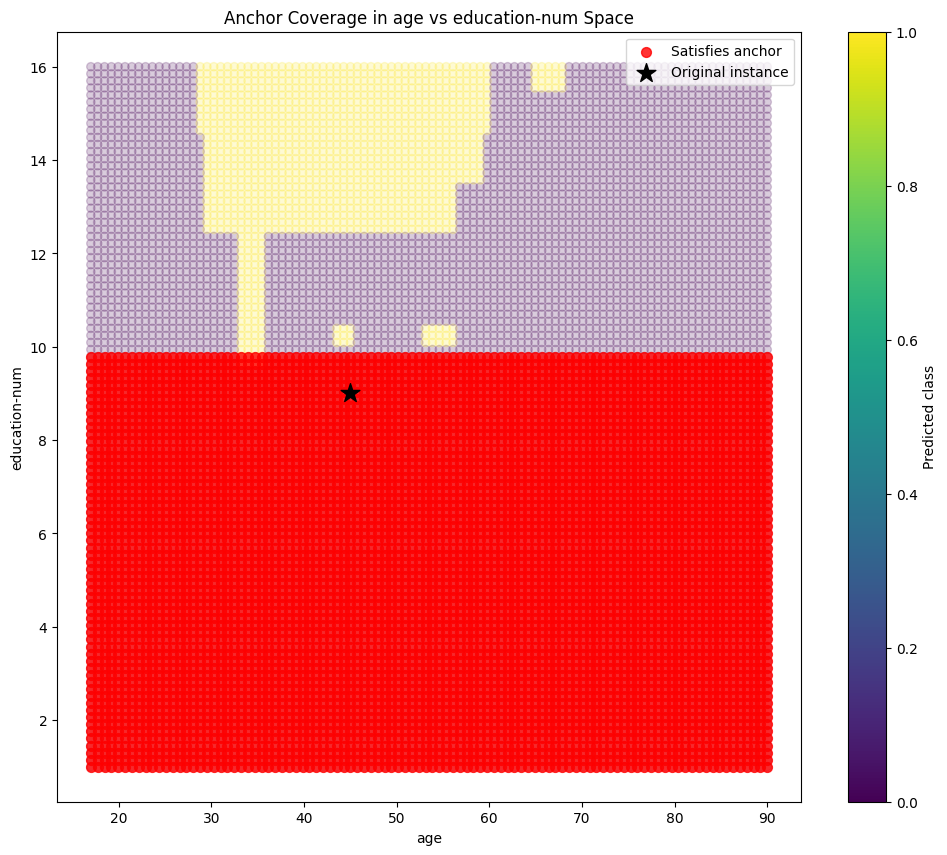
Notice how different factors emerge as important for low-income predictions: limited education and low capital gains appear as crucial factors.
What Makes a Good Anchor? #
When evaluating anchors, we care about:
- Precision: How reliable is the explanation? (higher is better)
- Coverage: What proportion of similar instances does it cover? (higher means more generalizable)
- Complexity: How many conditions in the rule? (fewer is better for human understanding)
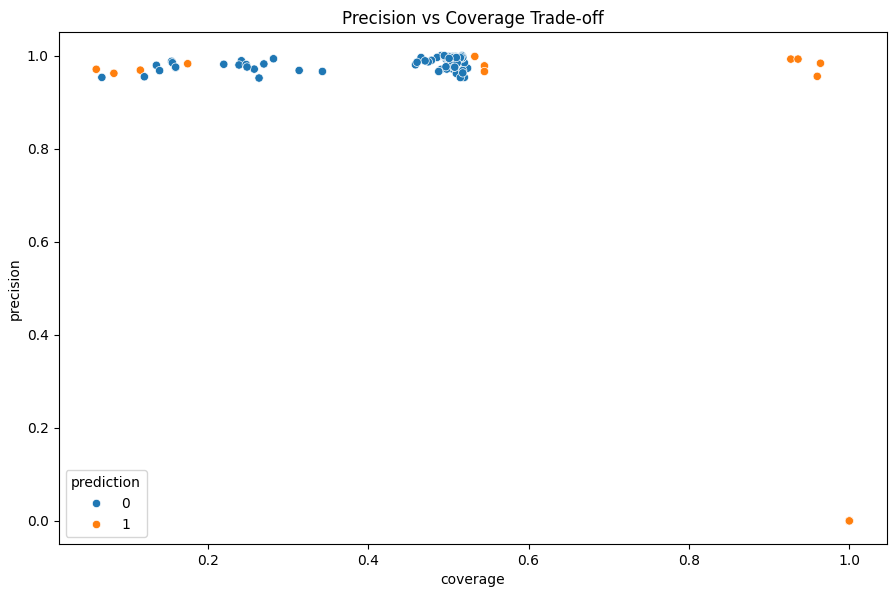
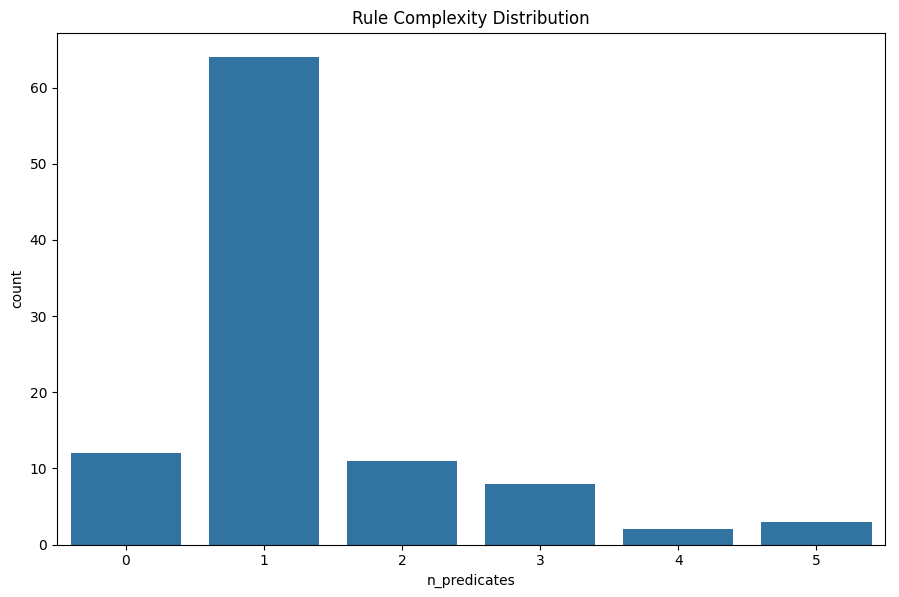
The best anchors achieve high precision with few conditions and reasonable coverage. Our algorithm aims to optimize this balance.
Interactive Anchor Explanations #
One of the most powerful ways to explore anchors is through interactive tools. Here’s what an interactive anchor explorer might look like:
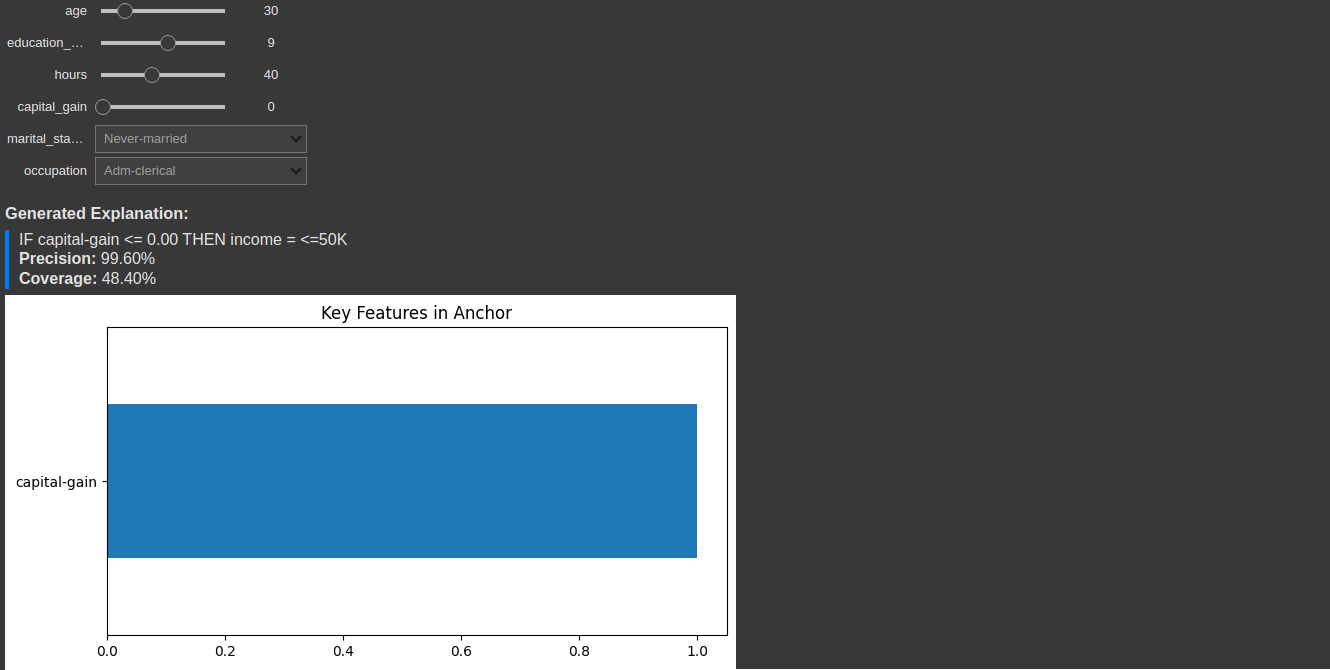 Interactive tools allow users to explore different scenarios and understand model behavior
Implementation Guide: Building Your Own Anchors Explainer #
Let’s put everything together into a reusable AnchorExplainer class:
class AnchorExplainer:
    def __init__(self, model, categorical_features, numerical_features, feature_ranges):
        """Initialize the Anchor explainer."""
        self.model = model
        self.categorical_features = categorical_features
        self.numerical_features = numerical_features
        self.feature_ranges = feature_ranges

    def explain(self, instance, precision_threshold=0.95, max_anchor_size=5):
        """Generate an anchor explanation for the given instance."""
        anchor, precision = beam_search(
            instance, self.model,
            self.categorical_features, self.numerical_features,
            self.feature_ranges, precision_threshold, max_anchor_size
        )
        return anchor, precision

    def explain_formatted(self, instance, precision_threshold=0.95, max_anchor_size=5):
        """Generate a human-readable anchor explanation."""
        anchor, precision = self.explain(instance, precision_threshold, max_anchor_size)

        if not anchor:
            return "No anchor found with the specified precision threshold."

        # Format the anchor as an IF-THEN rule
        conditions = []
        for feature, condition in anchor:
            if isinstance(condition, tuple):  # Numerical feature
                op, value = condition
                if op == '>=':
                    conditions.append(f"{feature} >= {value:.2f}")
                elif op == '<=':
                    conditions.append(f"{feature} <= {value:.2f}")
            else:  # Categorical feature
                conditions.append(f"{feature} = '{condition}'")

        # Get prediction
        instance_df = pd.DataFrame([instance]).reset_index(drop=True)
        prediction = self.model.predict(instance_df)[0]
        prediction_label = ">50K" if prediction == 1 else "<=50K"

        rule = "IF " + " AND ".join(conditions) + f" THEN income = {prediction_label}"

        return {
            "rule": rule,
            "precision": precision,
            "anchor": anchor
        }
Using Anchors in Your Projects #
To use Anchors in your own projects, follow these steps:
- Prepare your data: Identify categorical and numerical features
- Define feature ranges: Set valid ranges for perturbations
- Create the explainer: Initialize with your model and feature information
- Generate explanations: Apply to instances you want to explain
# Example usage
explainer = AnchorExplainer(
    model=your_model,
    categorical_features=['occupation', 'education', 'marital-status'],
    numerical_features=['age', 'hours-per-week', 'capital-gain'],
    feature_ranges=feature_ranges  # Dictionary with valid ranges for each feature
)

# Generate explanation
explanation = explainer.explain_formatted(instance)
print(explanation['rule'])  # Print the rule
print(f"Precision: {explanation['precision']:.4f}")  # Print precision
Fairness Analysis Using Anchors #
Anchors can help identify if models behave differently across demographics:
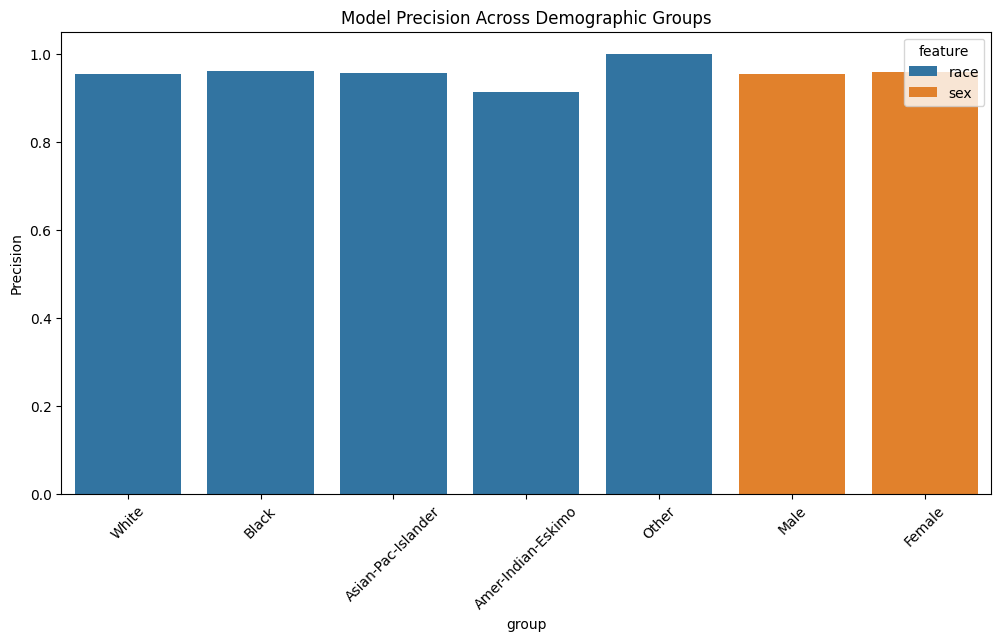 Different explanation patterns across groups may indicate bias
By analyzing anchor rules across different demographic groups, we can spot potential unfair patterns in model behavior.
Conclusion: When to Use Anchors #
Anchors are particularly valuable when:
- Precision matters: You need guarantees about explanation reliability
- Rules are preferable: Your users better understand if-then statements than feature importance scores
- Actions are needed: You want explanations that guide decisions
- Local understanding is the goal: You care more about explaining specific predictions than model-wide behavior
By implementing Anchors in your ML pipeline, you can provide trustworthy, human-understandable explanations that help users confidently act on model predictions.
References #
- Ribeiro, M. T., Singh, S., & Guestrin, C. (2018). Anchors: High-precision model-agnostic explanations. In Proceedings of the AAAI Conference on Artificial Intelligence.
- Adult Income Dataset